Several agents. One window. Split-pane view.

Put Claude, Codex and Gemini in a meeting. Leave with the feature built.

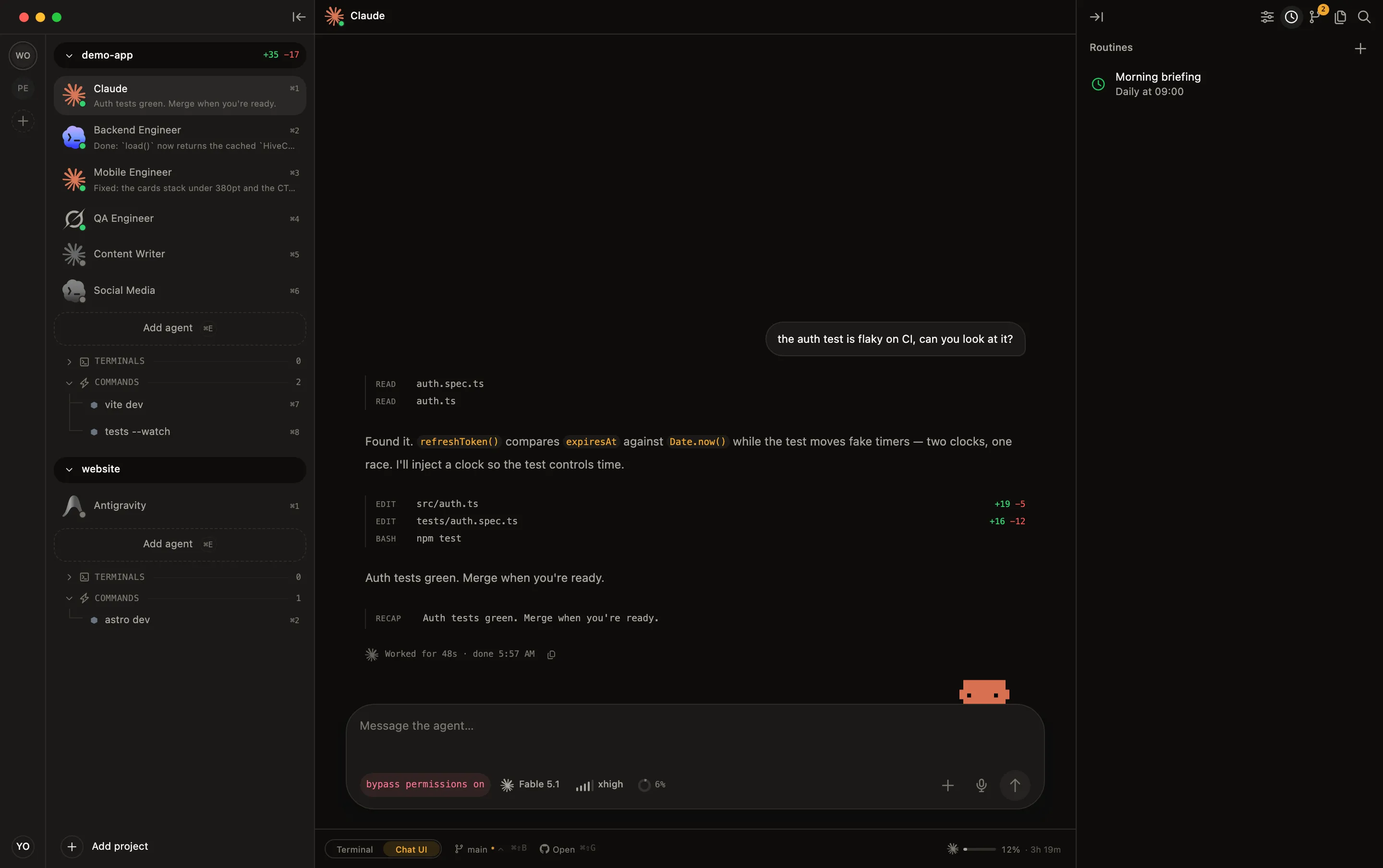
Stop alt-tabbing to babysit agents: watch Claude Code , Codex , Gemini & Grok side by side and let one orchestrate the rest — debate, review, plan or dev squad — with every message in chat threads, not scrollback. 100% local, on the subscriptions you already pay for.
macOS
Windows
Linux

Your agents, in a room, getting it done

Pick a template, write the topic, choose the participants. One agent orchestrates the others over a structured message bus — you read the whole exchange as chat threads and get the outcome as a highlighted card.

⌘⇧J → pick a template → write the topic → watch them work

Decision

Two agents argue opposing sides of a call you need to make. Ends with a verdict.

Brainstorm

Different perspectives on one question, merged into a synthesis.

Review

A defender vs. attackers over your code or approach, before you ship it.

Plan

Product and engineering lenses draft and merge an actionable plan.

Dev squad

Splits a feature between agents that build it in parallel in your repo — exclusive file ownership, cross-review, delivery report.

Custom

Write your own brief — roles, rounds and flow are up to you.

Decision · Orchestrator

Use Postgres with SKIP LOCKED for the queue: zero new infra and transactional consistency win at this stage. Revisit BullMQ past ~5k jobs/s. Both sides agreed dual-write is the real risk.

Every meeting ends with a card like this — the decision, not the scrollback.

Three steps, no magic

1

Open a project

Add a project folder. HiveTerm detects your stack automatically.

2

Set up your agents

Add agents and commands. Configure in the UI or write a hive.yml.

3

Start your swarm

Auto-start bees boot the moment you open the project, coordinate via MCP, and notify you when they need you.

Works with the CLIs you already use

Claude Code, Codex, Gemini, OpenCode, Amp, Cline, Grok — plus any dev server, watcher, or build command. No lock-in, no reselling your tokens.

Claude Code Claude Code Codex Codex Gemini Gemini OpenCode OpenCode Amp Amp Cline Cline Grok Grok

Auto-detects Node, Laravel, Rust, Go, Python & Rails the moment you open a project.

Built for people running real agent teams

"I'm CTO of a group with five-plus companies, so three or four projects open at once is just my normal day. Doing that across Cursor and the stock macOS terminal was a mess, and I kept losing track of which agent was doing what. So I built HiveTerm. Today I run 4 projects and 9 agents in parallel and know exactly what each one is doing."

Ebrahim Leite
Creator of HiveTerm
"Three things running at once: Claude Code, Codex, and my dev server. Hive is the first time I could actually watch what each one was doing instead of alt-tabbing and guessing. And the sub-agent tree got me. Claude spins up its own helpers and you just see them show up."

João Pedro
João Pedro
Full-stack Developer
7

AI agents supported

6

meeting templates built in

3

macOS, Windows & Linux

~20 MB

native, no Electron

Everything your stack needs, in one window

Define it in YAML, review and ship with git, search every file, and talk to your agents — all without leaving the hive.

Your whole stack in one hive.yml

Define every agent and process once. Commit it to the repo. Your teammate clones, opens the project, and gets the exact same workspace — same agents, same env, same instructions.

  • Per-bee env, working dir, auto-start and auto-restart
  • Restart-on-file-change for watchers and dev servers
  • System-prompt instructions injected at agent startup
hive.yml
# Your whole stack, versioned in git
name: My App
bees:
  claude:
    type: agent
    command: claude
    instructions: "Senior engineer. Ship clean PRs."
  api:
    command: npm run dev
    auto_start: true
    restart_on_change: ["src/**"]
  worker:
    command: php artisan queue:work
feat/queen-tree
+64 −9
OPEN #128 · Add live sub-agent tree
src/queen/spawn.rs +42 −6
src/sidebar/Tree.tsx +18 −3
hive.yml +4 −0
feat: live sub-agent tree…

Review, commit, and ship without leaving the hive

A live diff panel, inline commit and push, one-click pull requests. When an agent finishes, hit "Ask Claude" and it writes the commit message for you.

  • Diff panel with per-file +/- counts and PR status
  • Inline commit, push and create-PR — no context switch
  • Syntax-highlighted file viewer with VSCode-style search

Find any file, search every line

A built-in file tree and VSCode-style search across your whole project — fuzzy-find by name, or grep every line with case, whole-word and regex toggles.

  • Fuzzy file finder, basename-weighted — jump to any file in a keystroke
  • Find in Files with case, whole-word and regex; results grouped by file, jump to the exact line
  • Syntax-highlighted viewer (Shiki, 37+ languages) that respects your .gitignore
spawn_bee
Aa ab .*
src
queen
mcp_server.rs
spawn.rs
sidebar
Tree.tsx
hive.yml
3 results · 2 files
src/queen/mcp_server.rs
42fn spawn_bee(req: SpawnReq) {
src/sidebar/Tree.tsx
18await spawnBee(beeId)
61const id = spawnBee(child)
Voice input

Talk to your agents

Press a key, say what you want, and the text shows up in the agent's input. Useful when you've got an idea but don't feel like typing two paragraphs.

  • You drop in an OpenAI or Groq key. The audio goes straight there.
  • It auto-stops when you stop talking. You set how long the silence has to be, or disable it.
  • 11 languages, plus auto-detect. Or just tell it to use whatever language the app is in.
  • The transcription lands in the input. Nothing gets sent until you hit enter, so you can clean it up first.
M or click the floating mic in any agent terminal
0:00

Pin it now, deal with it later

Pin any line of output to a per-project checklist, keep notes under it, and let your agents manage both over the Hive MCP.

  • Pin output from any terminal, even full-screen TUIs like Claude Code. Each pin gets a title and an editable body.
  • Agents create and check off pins over MCP, so Claude can track its own plan as it works.
  • A notes scratchpad per project that autosaves as you type.

And the details that keep you in flow

Four different AIs. One screen.

Split your window into a live grid — Claude Code on the left, Codex on the right, your dev server and tests below. Four different agents from four vendors, every pane a real terminal, all visible at once. No more alt-tab roulette to find which agent needs you.
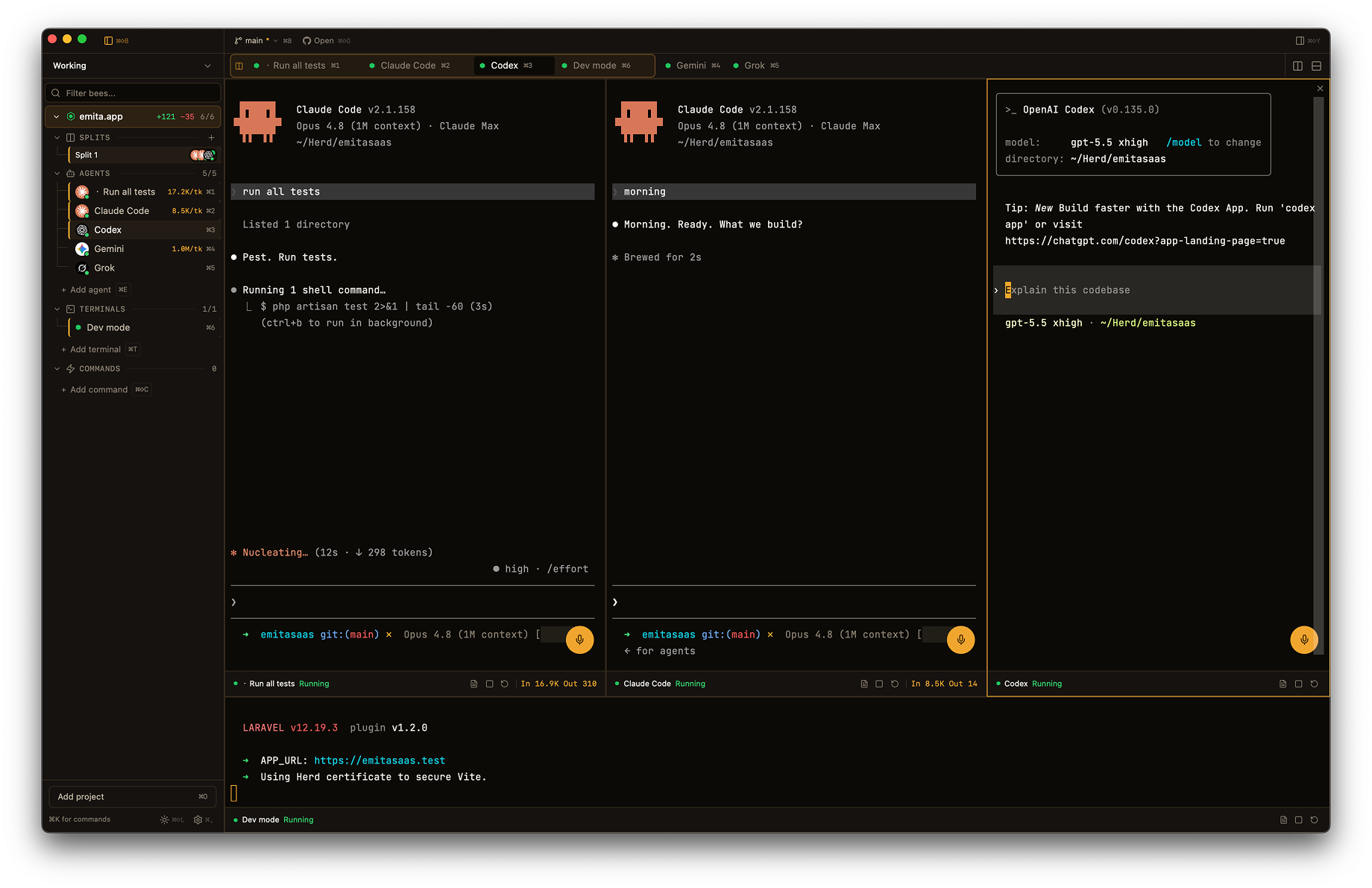
HiveTerm split panes — Claude Code, Codex and a dev server running side by side in one window

Any layout

Drag panes into 2-up, 3-up, or a 2×2 grid. Resize live, no restart.

Named split groups

Save a layout as a group — "Backend trio", "Review pair" — and reopen the whole arrangement in one click.

One keyboard, every pane

Focus follows your click — type into any agent without losing the others.

Crash recovery built in

Processes auto-restart on non-zero exit. When an agent crashes, you see the exit code, the last 30 lines, and a Restart button.

Notified, not interrupted

Build done, test failed, agent stuck? You get a native OS notification — not a blinking tab you might miss.

Warm, themeable, yours

A warm light/dark palette that follows your OS, five bundled mono fonts, and a UI translated into English, Portuguese & Spanish.

One agent becomes a swarm

Hive runs a local MCP server on an available port. Your agents use it to spawn sub-agents, read each other's output, and ping you when they're done — and the whole tree is right there in your sidebar.

Live swarm
queen · mcp
Claude orchestrator
test-fixer
docs-writer
Codex
refactor-helper
dev-server :5173

Spawn on demand

An agent calls spawn_bee to delegate work to a fresh sub-agent, then keeps working on its own task.

Project-isolated

Sub-agents only see bees in their own project. No cross-talk, no surprises across workspaces.

You stay in the loop

Every sub-agent appears in the tree with live status, and any of them can fire a native notification.

20 MCP tools, out of the box
spawn_bee Create new processes and agents on the fly
kill_bee Stop any running process
restart_bee Restart crashed or stale processes
list_bees See all processes across projects
get_bee_status Check health and uptime of any bee
read_output Read terminal output from any process
write_input Send input to running processes
notify Push native desktop notifications
list_pins List the pins on any project board
create_pin Pin a message or its own plan to the board
update_pin Edit a pin's title or body
set_pin_done Check a pin off when the work is done
delete_pin Remove a pin from the board
get_notes Read a project's notes scratchpad
set_notes Replace a project's notes
append_notes Append a line to a project's notes
send_message Send a structured message to another agent
read_inbox Receive messages from other agents, no scraping
reply Answer a message, correlated to its thread
await_reply Block until another agent answers

Built for multiple agents, not just tabs

Feature HiveTerm Conductor Warp T3 Code
Agents collaborate in Meetings
Sub-agent tree (MCP)
Pins & notes, agent-managed (MCP)
Live split-pane grid of different agents
Runs your dev stack (servers, workers)
macOS, Windows & Linux
Config-as-code workspace
Claude, Codex, Gemini & Grok
Inline diff, commit & PR
Voice input
3 languages (EN/PT/ES)

Free to start. Pro when you need more.

Free

Enough to run a real project with a swarm.

$0 /forever
Download Free
  • Up to 2 projects
  • 3 bees per project
  • 6 total bees
  • 1 MCP sub-agent
  • Full terminal & PTY support
  • Config-driven setup

Pro

MOST POPULAR

No limits. Run as many projects, bees, and sub-agents as you want.

$99 /year
Try Pro free for 14 days

No credit card. Not for you? Full refund within 30 days.

  • Unlimited projects
  • Unlimited bees per project
  • Unlimited sub-agents
  • Unlimited MCP orchestration
  • Everything in Free
  • 2 machine activations

14-day free trial · 30-day money-back guarantee

Frequently Asked Questions

Which agents does HiveTerm support?
Any CLI agent — Claude Code, Codex, Gemini, and Grok are first-class, with one-click flag presets. You can also run any other command-line tool, dev server, watcher, or build process as a "bee".
Do you resell tokens or lock me into a plan?
No. You bring your own subscription or API keys. HiveTerm never proxies your agents or resells tokens — everything runs locally on your machine.
What exactly is the MCP server?
A local Model Context Protocol server we call the Queen. It picks an available port automatically and exposes 20 tools that let your agents spawn sub-agents, message each other directly, read each other's output, and send you notifications. Sub-agents are isolated per project.
Which platforms are supported?
macOS (Apple Silicon and Intel), Windows 10/11, and Linux. The app is built with Rust + Tauri, so it's small and fast — around 20MB.
Is my code or terminal output sent anywhere?
No. Your code, terminal output, and clipboard never leave your machine. Analytics are cookie-free and contain no personal data or terminal contents.
What do I get for free?
Up to 2 projects, 6 total bees, and 1 MCP sub-agent — plus the full terminal, config, and git features. Pro lifts every limit for $99/year (regional pricing applies).
How many machines can I use Pro on?
A Pro license activates on 2 machines. Licenses validate offline and keep working for a 7-day grace period after expiration.
Is there a trial or refund?
Yes — a 14-day free trial with no credit card, and a 30-day money-back guarantee if Pro isn't for you.
Can I run multiple AI agents at the same time?
Yes. HiveTerm splits its window into a live grid so you can run Claude Code, Codex, Gemini, Grok and your dev processes side by side — every pane is a real terminal, all visible at once. You watch them all work instead of tabbing between single-pane terminals.
What are named split groups?
A named split group is a saved pane layout — say, one agent writing code next to a dev server, a test watcher, and a second agent reviewing the diff. Name it, switch to it instantly, and reopen the same multi-agent workspace every time.
Is HiveTerm an Orca (ADE) alternative?
Yes — with a different philosophy. Orca isolates agents in git worktrees so they race on a task; HiveTerm makes agents collaborate in Meetings: one orchestrates the others to debate, review, plan or build a feature together, and your dev stack runs alongside as managed processes. See the full comparison on our compare page.
Can Claude Code, Codex and Gemini work together on one task?
Yes. Start a Meeting (⌘⇧J), pick the Dev squad template, write the task, and choose the team. One agent orchestrates: it splits the work with exclusive file ownership, the others build in parallel in your repo, cross-review each other and close with a delivery report — cross-vendor teams included.

Start your swarm. It's free.

Download, open a project, and watch your agents swarm. You'll know in 60 seconds if this is for you.